


Storage Compartments
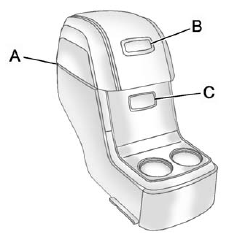
For vehicles with a second row center console, press the buttons (B) or (C) to access storage areas.
Lift up on (A) for additional storage area.
See Floor Console Storage on page 4‑3.
See also:
Listing All Paired and Connected Phones
The system can list all cell phones paired to it. If a paired cell phone is also connected to the vehicle, the system responds with “is connected” after that phone name.
1. Press and hold for tw ...
Using Softkeys to Control a USB Storage Device or iPod
The five softkeys below the radio display are used to control the functions listed below.
To use the softkeys:
1. Press the first or fifth softkey below the radio display to display the functions li ...
Using this Manual
To quickly locate information about the vehicle, use the Index in the back of the manual. It is an alphabetical list of what is in the manual and the page number where it can be found. ...