


Dome Lamp Override
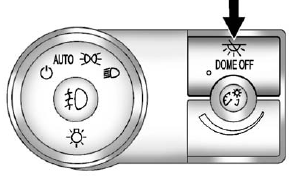
The dome lamp override button is next to the exterior lamps control.
 DOME OFF: Press the top of the button in and the dome lamps remain off when a door is opened.
An indicator light on the button comes on to show that the dome lamps are off. Press near the bottom of the button so the dome lamps come on when a door is opened.
See also:
Delayed Locking
The vehicle may have the delayed locking feature. When locking the doors with the power lock switch and a door is open, the doors will lock five seconds after the last door is closed. You will hear th ...
Bulb Replacement
For the proper type of replacement bulbs, see Replacement Bulbs on page 10‑29.
For any bulb-changing procedure not listed in this section, contact your dealer. ...
Automatic Dimming Rearview Mirror
The vehicle may have an automatic dimming inside rearview mirror.
Automatic dimming reduces the glare from the headlamps of the vehicle behind you. The dimming feature comes on and the indicator ligh ...