


Removing the Spare Tire and Tools
To access the spare tire and tools:
1. Open the liftgate. See Liftgate on page 2‑9.
2. Lift the load floor up.
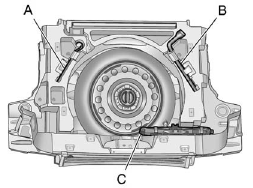
Coin/Pierce Jack with One-Piece Wrench
A. Extension
B. Wheel Wrench
C. Jack
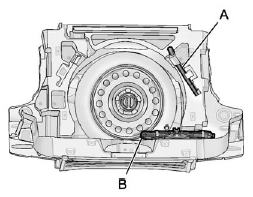
Hex-Head Jack with Three-Piece Wrench
A. Wheel Wrench
B. Jack
3. If you have a coin/pierce jack and one-piece wrench, remove the extension (A), wheel wrench (B) and jack (C).
If you have a hex-head jack and three-piece wrench, remove the wheel wrench (A) and jack (B).
Place the tools next to the tire being changed.

4. Turn the retainer nut counterclockwise and remove the spare tire.
5. Place the spare tire next to the tire being changed.
See also:
Connecting a USB Storage Device or iPod®
To connect a USB storage device, connect the device to the USB port located in the instrument panel storage area. See Instrument Panel Storage on page 4‑1 for more information.
The USB port c ...
Preprogrammed Playlists
Preprogrammed playlists that were created using WinAmp™, MusicMatch™, or Real Jukebox™ software can be accessed; however, they cannot be edited using the radio. These playlists are treated as sp ...
Interior Mirror
The automatic dimming rearview mirror reduces the glare from other vehicle headlamps. Each time the vehicle is started, the dimming feature comes on.
See Automatic Dimming Rearview Mirror on page 2&# ...