


How the System Works
The LDW camera sensor is on the windshield ahead of the rearview mirror.
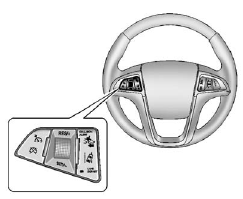
To turn LDW on and off, press the LANE DEPART control on the steering wheel. The control indicator will light when LDW is on.
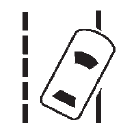
When the vehicle is started, the LDW indicator on the instrument panel will come on briefly.
LDW operates at speeds of 56 km (35 mph) or greater. If LDW is on, the LDW indicator will appear green if the system detects a left or right lane marking. This indicator will change to amber, flash, and three beeps will sound if the vehicle crosses a detected lane marking without using the turn signal.
To change the volume of the warning chime, see “Chime Volume” under Vehicle Personalization on page 5‑33 for more information.
See also:
Programming Universal Home Remote — Fixed Code
For questions or help programming the Universal Home Remote System, call 1-866-572-2728 or go to www.learcar2u.com.
Most garage door openers sold before 1996 are Fixed Code units.
Programming a gara ...
Curve Tips
• Take curves at a reasonable speed.
• Reduce speed before entering a curve.
• Maintain a reasonable steady speed through the curve.
• Wait until the vehicle is out of the curve before acce ...
Cargo Box & Towing
One benefit of the Canyon's low ride height is that the cargo box is very
accessible. Whether you have to lift something over the side of the box or load
something with the tailgate down, the low- ...