


Driving with the Blind Spot Mirror
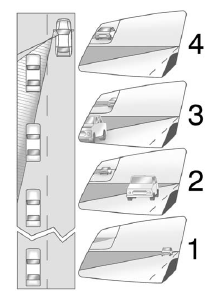
Actual Mirror View
1. When the approaching vehicle is a long distance away, the image in the main mirror is small and near the inboard edge of the mirror.
2. As the vehicle gets closer, the image in the main mirror gets larger and moves outboard.
3. As the vehicle enters the blind zone, the image transitions from the main mirror to the blind spot mirror.
4. When the vehicle is in the blind zone, the image only appears in the blind spot mirror.
See also:
Transferring Service
Push to request account transfer eligibility information. The Advisor can assist in canceling or removing account information. If OnStar receives information that vehicle ownership has changed, OnSta ...
Using the “Digit Dial” Command
The digit dial command allows a phone number to be dialed by entering the digits one at a time.
After each digit is entered, the system repeats back the digit it heard followed by a tone.
If an unwa ...
Storing and Deleting Phone Numbers
The system can store up to 30 phone numbers as name tags in the Hands-Free Directory that is shared between the Bluetooth and OnStar systems, if equipped.
The following commands are used to delete an ...