


Lane Departure Warning (LDW)
For vehicles with LDW, it is intended to help avoid unintentional lane departures. It may provide a warning if the vehicle is crossing a lane without using a turn signal. LDW uses a camera sensor to detect the lane markings. It only operates at speeds of 56 km (35 mph) or greater.
The LDW indicator, @, appears green if a lane marking is detected. It changes to amber, flashes, and sounds three chimes if the vehicle crosses a detected lane marking without using the turn signal.
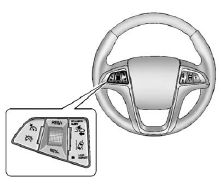
To turn LDW on and off, press the LANE DEPART button, located on the steering wheel.
See Lane Departure Warning (LDW) on page 9‑48 for more information.
See also:
Center Dome Lamps
There are front and rear dome lamps.
The dome lamp controls are located in the overhead console. To change the settings,
press the following:
: Turns the lamp off, even when a
door is open.
: ...
How the System Works
The LDW camera sensor is on the windshield ahead of the rearview mirror.
To turn LDW on and off, press the LANE DEPART control on the steering wheel.
The control indicator will light when LDW is ...
Playing from an iPod
This feature supports the following iPod models:
○ iPod nano (1st, 2nd, 3rd, and 4th generation)
○ iPod with video (5.0 and 5.5 generation). Video is not shown; only audio is supported.
...