


Trailer Brake Control Panel
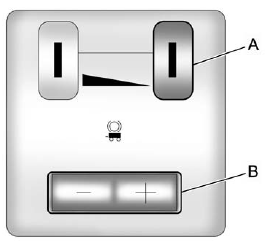
A. Manual Trailer Brake Apply Lever
B. Trailer Gain Adjustment Buttons
The ITBC system has a control panel located on the instrument panel to the left of the steering column. See Instrument Panel (Base/Uplevel Version) on page 1‑2 or Instrument Panel (Premium Version) on page 1‑6 for more information. The control panel allows adjustment to the amount of output, referred to as trailer gain, available to the electric trailer brakes and allows manual application of the trailer brakes. The Trailer Brake Control Panel is used along with the Trailer Brake Display Page on the DIC to adjust and display power output to the trailer brakes.
See also:
Brake System Warning Light
With the ignition on, the brake system warning light comes on when the parking brake is set. If the vehicle is driven with the parking brake engaged, a chime sounds when the vehicle speed is greater t ...
Vehicle Messages
Messages are displayed on the DIC to notify the driver that the status of the vehicle has changed and that some action may be needed by the driver to correct the condition.
Multiple messages may appe ...
Safety
Standard safety features include:
Side curtain airbags with rollover sensor
Four-wheel-disc antilock brakes
Electronic stability system with roll-mitigation technology
Rear parking sensors
Backu ...