


Loading Points
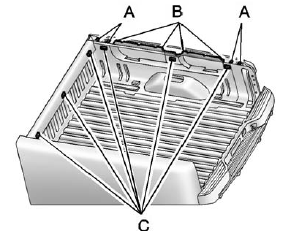
A. Primary Load Points
B. Secondary Load Areas
C. Cargo Management Option Holes
Structural members (A) and (B) are included in the pick-up box design.
Additional accessories should use these load points. Depending on the accessory design, use a spacer under the accessory at the load points to remove gap. The holes for the Cargo Management System (C) are not intended for attachment of aftermarket equipment. See www.gmupfitter.com for additional pick-up box load bearing structural information.
See also:
Antilock Brake System (ABS) Warning Light
The ABS warning light comes on briefly when the ignition key is turned to ON/RUN. This is normal.
If the light does not come on then, have it fixed so it will be ready to warn you if there is a pro ...
Checking the Fluid Level
Prepare the vehicle as follows:
1. Park the vehicle on a level place. Keep the engine running.
2. With the parking brake applied, place the shift lever in P (Park).
3. With your foot on the brake p ...
Other Information
The Bluetooth® word mark and logos are owned by the Bluetooth® SIG, Inc. and any use of such marks by General Motors is under license.
Other trademarks and trade names are those of their respective ...