


Tire and Loading Information Label
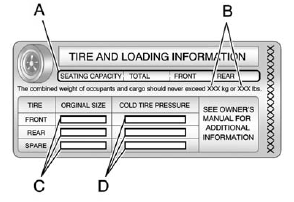
Label Example
A vehicle specific Tire and Loading Information label is attached to the center pillar (B-pillar). With the driver door open, you will find the label attached below the door lock post (striker). The tire and loading information label shows the number of occupant seating positions (A), and the maximum vehicle capacity weight (B) in kilograms and pounds.
The Tire and Loading Information label also shows the size of the original equipment tires (C) and the recommended cold tire inflation pressures (D).
For more information on tires and inflation see Tires on page 10‑54 and Tire Pressure on page 10‑62.
There is also important loading information on the vehicle Certification/Tire label. It tells you the Gross Vehicle Weight Rating (GVWR) and the Gross Axle Weight Rating (GAWR) for the front and rear axles. See “Certification/Tire Label” later in this section.
See also:
Passenger Airbag Status Indicator
If the vehicle has one of the indicators pictured in the following illustrations, then the vehicle has a passenger sensing system for the right front passenger position unless there is an airbag off s ...
Services for People with Disabilities
Advisors provide services to help subscribers with physical disabilities and medical conditions.
Push for help with:
• Locating a gas station with an attendant to pump gas.
• Finding a hotel, ...
Steering, Suspension, and Chassis Components
Visually inspect front and rear suspension and steering system for damaged, loose, or missing parts or signs of wear. Inspect power steering lines and hoses for proper hook-up, binding, leaks, cracks, ...