


Battery Replacement
Replace the battery if the REPLACE BATTERY IN REMOTE KEY message displays in the DIC.
Notice: When replacing the battery, do not touch any of the circuitry on the transmitter. Static from your body could damage the transmitter.
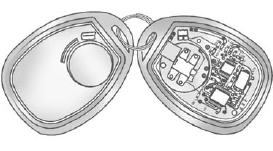
To replace the battery:
1. Separate the transmitter with a flat, thin object, such as a flat head screwdriver.
• Carefully insert the tool into the notch located along the parting line of the transmitter. Do not insert the tool too far. Stop as soon as resistance is felt.
• Twist the tool until the transmitter is separated.
2. Remove the old battery. Do not use a metal object.
3. Insert the new battery, positive side facing down. Replace with a CR2032 or equivalent battery.
4. Snap the transmitter back together.
See also:
Language
This display allows you to select the language in which the DIC messages will appear. To select a language:
1. Press the trip odometer reset stem until ODOMETER displays.
2. While in the ODOMETER di ...
Windshield Wiper/Washer
The front wiper control is located on the turn and lane-change lever.
The windshield wipers are controlled by turning the band with
on it.
(Mist): For
a single wipe, turn to , then
release ...
What to Use
To determine what kind of fluid to use, see Recommended Fluids and Lubricants on page 11‑12. Always use the proper fluid.
Notice: Use of the incorrect fluid may damage the vehicle and the damag ...