


Parking Brake
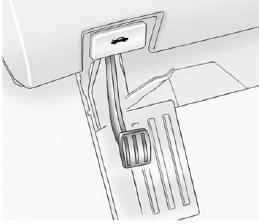
To set the parking brake, hold the regular brake pedal down, then push the parking brake pedal down.
If the ignition is on, the brake system warning light will come on.
See Brake System Warning Light on page 5‑21.
Notice: Driving with the parking brake on can overheat the brake system and cause premature wear or damage to brake system parts. Make sure that the parking brake is fully released and the brake warning light is off before driving.
To release the parking brake, hold the regular brake pedal down, then push down momentarily on the parking brake pedal until you feel the pedal release. Slowly pull your foot up off the park brake pedal.
If the parking brake is not released when you begin to drive, the brake system warning light will be on and a chime will sound warning you that the parking brake is still on.
If you are towing a trailer and are parking on a hill, see Driving Characteristics and Towing Tips on page 9‑45.
See also:
Three-Way Calling
Three-way calling must be supported on the cell phone and enabled by the wireless service carrier.
1. While on a call, press .
2. Say “Three-way call.” 3. Use the dial or call command to dial th ...
If the On Indicator is Lit for a Child Restraint
If a child restraint has been installed and the on indicator is lit:
1. Turn the vehicle off.
2. Remove the child restraint from the vehicle.
3. Remove any additional items from the seat such as bl ...
License Plate Lamp
To replace one of these bulbs:
1. Remove the two screws holding each of the license plate lamps to the liftgate trim.
2. Turn and pull the license plate lamp forward through the liftgate trim open ...