


Cargo Management System
This vehicle has a cargo management system located in the rear.
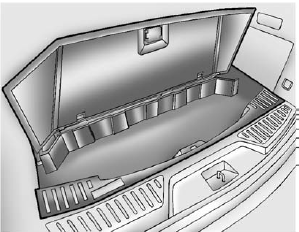
To remove the cargo management cover:
1. Open the cover. It remains open when lifted.
2. Pull the cover up making sure to unhook the hinges at the rear of the cover.
WARNING
An improperly latched and closed cargo cover, or cargo cover left in the open position, could be thrown about the vehicle during a crash or sudden maneuver.
Someone could be injured.
Be sure to return the cover to the closed position and latch before driving. If the cover is removed, always store it outside of the vehicle. When it is replaced, always be sure that it is securely reattached.
3. Remove the cover from the vehicle and store outside of the vehicle.
See also:
What to Use
WARNING
Adding only plain water or some other liquid to the cooling system can be dangerous. Plain water and other liquids, can boil before the proper coolant mixture will.
The coolant warning syste ...
Trademarks and License Agreements
Manufactured under license under U.S. Patent #'s: 5,451,942; 5,956,674; 5,974,380; 5,978,762; 6,487,535 & other U.S. and worldwide patents issued & pending. DTS and the Symbol are registered ...
DVD-A (Audio) Display Buttons
Once a DVD-A is inserted, the radio display menu shows several icons.
Press the softkeys under any icon during DVD playback. See the icon list below for more information.
A rear seat passenger can n ...