


Floor Console Storage
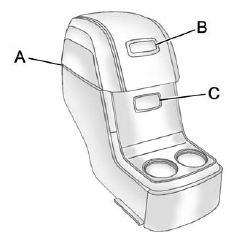
For vehicles with a second row center console, open each area to access the storage compartment inside.
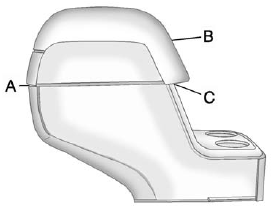
To access the upper storage area, press the upper button (B) and lift up. To access the lower storage area, press the lower button (C) and lift up. The top of the console can be folded forward for increased storage area. Lift up on the handle on the rear of the console (A) and pull forward.
WARNING
Never open more than one of the three latches at a time to help avoid personal injury and damage to the console.
Notice: Slide the front console as far forward as it will go before folding the second row console forward to help prevent damage to the consoles.
See also:
USB-Supported Devices
• USB flash drive
• Portable USB hard drive
• Fifth generation or later iPod
• iPod nano
• iPod touch
• iPod classic
Not all iPods and USB drives are compatible with the USB port.
M ...
When to Add Engine Oil
If the oil is below the cross-hatched area at the tip of the dipstick, add 1 L (1 qt) of the recommended oil and then recheck the level. See “Selecting the Right Engine Oil” in this section for ...
EXTERIOR
The Acadia Denali can be compared to your favorite pair of jeans. It looks
great, flatters your features and is durable enough to stand up to the
day-to-day rigors of real life.
Fog lights and d ...